

7.6 KiB
| title | date | tags | |||||
|---|---|---|---|---|---|---|---|
| [old] this is what you’re missing out on with continuous deployment | 2016-08-12 |
|
disclaimer: this post is really old, from when i first started writing technical articles. it's from 2016.

Ship it harder, better, faster, stronger
A few months ago, Lennon asked me to look into Continuous Deployment options for devAcademy. I got excited.
I had used a few CD platforms before with my very short lived experience with setting up a server for a really obscure video game. Most of the forks around there used Travis for their projects to make sure their builds would at least run, but I felt like there was more to continually integrating a project. I wanted to learn more, and now I had the opportunity to do so. Woo!
Now, you’re probably asking yourself,
What can I do with Continuous Integration and Continuous Deployment?
Here’s what I found out:
Robots test things so you don’t have to
You can use CD to run unit tests automatically. Our website, which runs on Rails, has a bunch of RSpec tests that run, and all of those tests have to pass before any changes are accepted into the master branch.
Now, RSpec can be run by itself using Guard, but I’ve never had any success with it, personally. This means we have to run tests ourselves locally before we commit to make sure our code works.
You know how many times we forget to run our tests?
Every. Single. Time.
How do we fix this? Automate it!
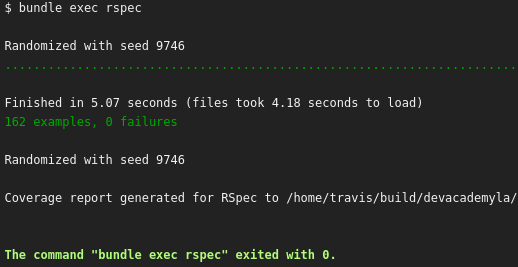
this feels so satisfying to look at
By using a Continuous Integration platform, we can make sure that each commit we make passes all of our tests.
Once a commit is pushed to our GitHub repos, our CI/CD platform grabs the latest copy and starts to run commands based on our configuration file in the repository, which is super easy to configure. Once the command goes green, you can ship it! Super simple stuff.
We also have Simplecov to check our code coverage, which runs right alongside our RSpec tests. That means that when we run a build, we also get a percentage of how much code we’re actually testing.

Real neat-o.
Robots check things so you don’t have to
You can use a CI/CD platform to check your code automatically.
The previously mentioned Rails app we maintain every day has to have some sort of rigorous standard so that our code continues to be awesome. We use Rubocop to make sure that we follow the Ruby style guide made by the community in all of our Ruby/Rails projects.

“Role models are important.” — Robocop
As I mentioned earlier, we have to run our tests manually on our end, and sometimes we forget. With Rubocop, it’s the same. We forget to check our code often. This sometimes leads to us committing things that aren’t in line with the rest of our code, which is bad.
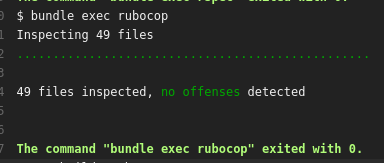
aesthetically pleasing
Luckily, we’ve set up our CI/CD platform to run Rubocop right after RSpec. If something isn’t up to standard, the build fails, and we don’t ship it until it’s fixed. It’s a great way of making sure you write awesome code.
Robots tell you that you messed up (so you don’t have to)
So, let’s say you get your CI/CD provider setup. Issue is, you have to wait for every build to pass, and that wastes time… you have other things you need to be doing instead, right? You look away and you forget about the build failing… and you think to yourself,
“Wouldn’t it be great if I could receive notifications for my builds in the chat client I’m using so I can continue working without having to worry about checking on it?”
WELL, DO I HAVE SOME GOOD NEWS FOR YOU.
A lot of CI/CD providers I’ve seen these days have integrations for Slack (which you should be using, if you didn’t know).
In our Slack team we get messages when our builds have completed. These can either be passing… or failing. When our builds fail, we normally laugh at each other about it:
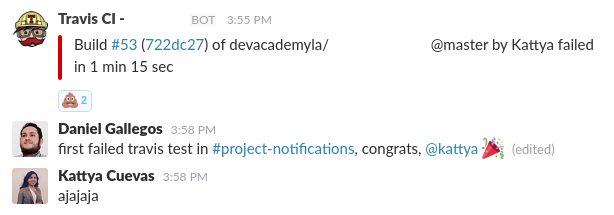
#MalKattya
…And when our build passes, we congratulate each other for fixing it!
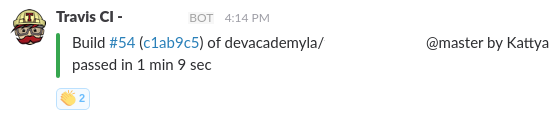
#BienKattya
This helps us know the state of all of our projects without having to leave Slack, and lets us know our personal progress. Since all the build logs are shared in our team, we can help each other out, too!
Robots ship it automatically
We use Heroku for our apps. We used to deploy our application every time we made a new commit to master, and that got really boring really quickly. We couldn’t just push code immediately to production, we had to test it out manually.
So, guess what we did after we added all of the other cool continuous deployment stuff?
We turned this on:

What’s this button do?
One thing to note is the “Wait for CI to pass before deploy” option. This makes sure that our production app always has working tests and is always up to standard, because it checks that our CD build passed.
Awesome, right?
We use GitHub for all of our repos, and most CD providers have some sort of native GitHub support. Most providers even allow you to see if your build is green or not right in GitHub itself.
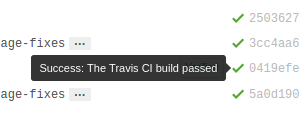
Ridiculously cool.
“So, how do I get started?”
We recommend using Travis CI. It isn’t the only option out there, but it’s one we use all the time and recommend fully. It’s a great place to get familiar with automating tests and code checks. Setup is as easy as pushing a YAML file to your repo. Best of all, it’s free for open source projects.
Travis CI isn’t the only hosted service out there. Here’s a few others:
What’s most important is that you get something that’s right for you. CI/CD is essential to coding these days. Why?
Continually deploying your code into production helps push features out faster and gets work done quicker, which makes everyone happier.
No more waiting to check if your code works or any other tests you need to do. Once you automate everything once and get it working right, you have less things to worry about in general.
That’s more time for you sit back, relax, and take it easy.

“I’ll ship it tomorrow…”
Pretty cool, right?

Just do it. You know you want to. ❤